Tampilkan postingan dengan label Review hardware. Tampilkan semua postingan

Apple TV Review 2011 UK Edition

Posted by Expresi 2012 Selasa, 11 Oktober 2011 0 komentar

If you asked a group of people to explain the Apple TV, I’d place a good bet that not even half of them could accurately describe it. “You watch TV on it”, wrong! Instead, the main feature of Apple TV is to rent on demand movies, like those you can rent on Sky, Virgin and other subscription TV services… so what purpose does this product really serve? In this Apple TV review 2011 we attempt to find out what this mysterious device really is.

Steve Jobs always referred to Apple TV as merely a ‘hobby’, it has never really been what we’d consider a main product from this giant company – look, it’s even listed under iPod on the Apple website. The first generation Apple TV was big, clunky and overly expensive for what it offered. People knew this, so even after updates to the interface, price cuts and plenty of promotion, it still didn’t take the world by storm.

The second generation Apple TV that we’ll be reviewing today was released in September 2010. After Apple realised they needed to rescue this player, they’ve made a sleeker, quieter and more purposeful product, with a much more understandable price tag of just £100.

Walk into an Apple retail store and try and find the Apple TV. It’s a tough challenge, its not because they don’t hold stock (possible), but the box is tiny! Especially if you were familiar with the size of the 1st generation product, you’ll need help, go and ask a rep, “You’re looking for the Apple whaaaa?” Ok I digress, but upon finding the small white box, you’ll notice its styled in true Apple form, minimalistic appearance, key details listed and a couple of photos.

IMG 0099 290x193 Apple TV Review 2011   UK EditionIMG 0100 290x193 Apple TV Review 2011   UK Edition


Cracking the lid open reveals the Apple TV sitting on a shelf in the upper half of the box and a bunch of familiar accessories resting below: setup guide, information guide and stickers to spam across your work mates back. Also included is a power cord with a nice long lead and a sleek aluminium remote control.

IMG 0102 290x193 Apple TV Review 2011   UK EditionIMG 0104 290x193 Apple TV Review 2011   UK Edition


IMG 0107 290x193 Apple TV Review 2011   UK Edition

I know the saying, bigger is better. But believe me, the size of the Apple TV will still satisfy the wife. It’s tiny! Measuring under 10cm in length on both sides and a few over 2cm in height, it will fit any position within your TV stand.

IMG 0122 550x366 Apple TV Review 2011   UK Edition

Okay so design, definitely an improvement over the predecessor. It features glossy sides, a matte black top and the Apple TV logo etched into the top, all contained in a sharp rounded design (like the iPhone 4).

IMG 0133 550x366 Apple TV Review 2011   UK Edition

The base is completely rubber and is swallowed outwards at the middle, which sort of gives the illusion that the device is floating. Slightly confusing when you try and shift the device, it grips very well, so no, you haven’t gone mad – the device doesn’t float.

IMG 0142 550x366 Apple TV Review 2011   UK Edition

You know those instructions that were included? I bet you haven’t read them, there’s no need, a good product shouldn’t need instructions telling you how to set it up and use it. Patience is a virtue, but when we’re talking tech, no one likes waiting. Fortunately the Apple TV is dead simple to connect up, plug the power cord in, connect your TV through HDMI and connect your amplifier via optical (optional). If you don’t have a WiFi network, there’s no need to feel old, Apple have provided an Ethernet connection. There’s also a mini USB port, which is for support/troubleshooting only.

IMG 0135 550x366 Apple TV Review 2011   UK Edition

Apple like to keep things simple, the remote reflects this. It’s constructed from solid aluminium and uses only navigation buttons, Menu and Play/Pause. No Power button? Hold the centre navigation button to turn on/off the device, much alike an iPod. An app is available from Apple for iPod/ iPhone and iPad that acts as a remote control.
IMG 0116 550x366 Apple TV Review 2011   UK Edition

source

Samsung 600B5B and Specifications Review

Posted by Expresi 2012 Jumat, 07 Oktober 2011 0 komentar
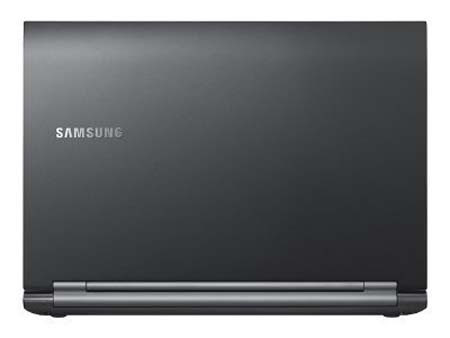
Computer Hardware & Software | A new Samsung Series 6 is added to Samsung laptop list with a new innovation and great performance. Samsung 600B5B features the next generation of Intel Core i7 (up to Quad Core) / i5 / i3, Windows 7 Professional, and intelligence-battery, which means that it reserves the right to obtain longer term. Samsung 600B5B has an anti-glare LED display, which is up to 40% brighter than normal and you can even see in direct sunlight. Additional security features like fingerprint recognition, data encryption software and a powerful anti-theft laptop makes it ideal for professional use.
To do things fast with blistering graphics performance and processing power with latest

Intel Core i7 processor (up to Quad Core) / i5 / i3 processor technology and an efficient and NVIDIA graphics card or graphics Intel HD . Try more office tasks and web browsing, even the most demanding applications, and enjoy a more productive workforce and happier.

Samsung 600b5b Battery Technology Intelligent battery keeps 80% of its original capacity of up to 1000 recharges – it’s up to 3 times longer than conventional battery. To make our batteries cheaper and more ecological than batteries must be replaced during the life cycle.


samsung 600b5b Samsung 600B5B Review and Specifications

Samsung 600B5B

a844fba499a83fbd53f00da396d6d7fb Samsung 600B5B Review and Specifications

Samsung 600B5B


Samsung 600b5b Specifications


Operating System
:
Genuine Windows 7 Professional (32-bit)

Processor
:
Intel Core™ i5 Processor 2410M (2.3GHz, 3MB)

Storage
:
500GB (5400rpm S-ATA) hard drive


:
Super Multi Dual Layer (S-ATA) ODD

Multimedia
:
1.3 megapixel HD Webcam


:
3 Watts Stereo Speaker (1.5 Watts x 2)


:
HD (High Definition) audio

Graphic
:
Shared Memory (Integrated Graphics)

System Memory
:
4GB (DDR3 / 4GB x 1)

Memory Slot
:
2 x SODIMM

Input
:
Touch Pad (Scroll Scope, Flat Type, Gesture UI)

Power
:
90 Watts AC Adapter


:
60 Watts AC Adapter

Security
:
Samsung Recovery Solution

Review Asus F1A75-I Deluxe FM1 Motherboard

Posted by Expresi 2012 Kamis, 06 Oktober 2011 1 komentar

Computer Hardware & Software | Review Asus F1A75-I Deluxe FM1 Motherboard | AMD caused quite a stir when they released the Fusion set of APU’s as it gave rival competition to Intel but with support for DirectX 11. Motherboard manufacturers were keen to jump on board producing Mini-ITX based boards around the E-350 APU. Shortly after the E-350 saga, AMD released the next in the APU line-up and this included the A8-3850, shortly followed by the slightly lower spec A6-3650 which differed by giving users a fully fledged socket, opposed to an all-in-one soldered APU like the E-350 had. This gave users a bit more flexibility in terms of upgrading the APU as and when they wanted or needed to.

With the Fusion platform as a whole doing really well in the market place, and many users finding that it’s a better alternative to an Atom/ION solution, a lot of brands were keen to manufacturer boards that can harness the true potential of the socket and overall platform.

With this in mind, we saw the likes of the Asus F1A75-M Pro Micro ATX board, Gigabyte A75M-UD2H board and even some new contenders with the Sapphire Pure Platinum A75 motherboard and whilst these particular products offered exactly what was needed, it took up a lot of space in the process.

This is where Mini-ITX comes into play as the Fusion platform has been accepted extremely well into the HTPC community and with motherboard vendors realising the potential behind it, they have started to develop boards with exactly that in mind.

To me, Mini-ITX is a fantastic platform as I find it so fascinating when companies can implement all of these wonderful features into such a small form factor, and that’s exactly what Asus have done with the board we’re looking at today. We’re taking a look at the F1A75-I Deluxe motherboard which is aimed directly at the home entertainment market with some unique features that will surely push them ahead in this segment of the market, right?

source:website

Win a Core i5-2500K, DZ68DB, and SSD 311 (Extended!)

Posted by Expresi 2012 0 komentar
Computer Hardware & Software | Win a Core i5-2500K, DZ68DB, and SSD 311 (Extended!) | Intel recently sent over four Core i5-2500Ks, four DZ68DB motherboards, and four SSD 311 solid-state drives for us to give away. To that we're adding 40 cases of Talking Rain SPARKLING Ice. You don't have to do a thing; just fill in our contest form.


Extended until October 5, 9 p.m. PDT.

When friends and family come to us for system building recommendations, we hit them hard and fast with enough information to make their heads pop. One of our most ardent suggestions is to mix solid-state and magnetic storage, installing performance-critical apps on the SSD (we’re fond of the 120 GB capacity point) and using the hard drive for everything else. Truly, that's the right way to balance performance and storage space at the best possible price.

SSDs are still expensive, though. And for many folks, the prospect of a big solid-state drive and an additional 1 or 2 TB disk is just too pricey.

Back in May, we reviewed Intel’s Z68 Express chipset, which included a feature called Smart Response Technology that employed a small SLC-based SSD as a transparent caching device. Algorithms in Intel's driver track data usage and cache the most frequently-read information on the 20 GB drive. The next time it's requested, the system pulls it from the SSD, rather than disk. Consequently, read operations have the potential to speed up quite a bit.

Because data has to stay synchronized between the hard drive and SSD, writes don’t enjoy nearly as much benefit. So, we maintain that independent solid-state and magnetic drives are still the way to get the most predictable from your storage subsystem.

If an 80 GB or larger SSD is out of your budget range, though (remember you still need an additional hard drive to go with it), or if you simply don't want to manually manage where data lives on your system, caching through Smart Response Technology is a perfectly viable way to improve performance beyond what you'd see from a hard drive on its own.

We've had plenty of time to play with the technology since our original review in May (and before that, our preview back in March). Now we have a quartet of Z68-based platforms to give away to lucky Tom's Hardware readers, compliments of Intel.

If you've been planning a Sandy Bridge-based build, this could be your lucky day.

SSD Caching Versus Tiered Storage

We have:

4 x Intel Core i5-2500K processors (the -2500K won our coveted Recommended Buy award back in January when Sandy Bridge first launched).
4 x Intel DZ68DB Z68 Express-based motherboards
4 x Intel 20 GB SSD 311 drives, based on SLC NAND flash

Four randomly-picked winners will get one CPU, one motherboard, and one SSD of their own. Twenty additional runners-up will receive two cases of Talking Rain SPARKLING Ice water to last you until the weather cools down a bit.

Here's what you need to do:

  1. Read the rules
  2. Fill out our SurveyGizmo entry form
  3. Wait for us to announce the winners
Source: website

Samsung Galaxy S II (AT&T) Simply Amazing SmartPhone

Posted by Expresi 2012 Senin, 03 Oktober 2011 0 komentar

Blog Hardware & Software | Review Samsung Galaxy S II (AT&T) Simply Amazing SmartPhone | I've been waiting for this phone since I caught wind of its release in Europe earlier this year. According to the AT&T sales rep, I was the first person in my state to buy it yesterday (I was there right when they opened at noon). I previously had the Samsung Captivate (Galaxy S 1) and I liked that phone a lot, but hated the fact that it was the only GS1 with no camera flash (***, AT&T, really?). Also, after a year of usage and tons of apps, my Captivate was starting to show its age; it just wasn't as responsive. The Galaxy S2 is far faster than I ever remember my Captivate being, though. I was surprised at how thin and light it is. It's amazingly responsive and zippy, flying through home screens and app screens like a ninja. Apps open up immediately with absolutely no lag. I don't have 4g in my area until later this season, so I can't comment on that just yet, but I will update once it arrives.


Pros: Super fast, amazing screen, nice nuances with Gingerbread OS, very thin

Cons: This isn't really a con, but I wish it had come with an hdmi cable like the Samsung Infuse.


Call quality was good, I had no complaints there. Gingerbread looks noticeably better than Froyo and some of my apps actually look slightly different once I redownloaded them from the Android Market. Overall, though, if you're already familiar with the Galaxy S 1, and the Galaxy S 1.5 (which is basically what the Samsung Infuse is) then you won't see a drastic cosmetic change here. Something I do find a little odd is that my Captivate responds to app notifications (WordFeud, at least) about a second sooner. One new feature that I particularly love is the Beaches Live Wallpaper that comes with the Galaxy S 2; this wallpaper reflects the weather outside in your local area (so does the Windmill Live Wallpaper), so if it's raining outside, it'll be raining on your phone's homescreen, if it's sunny outside, it'll be sunny on your phone, etc. I'll update this review as I become more familiar with the phone.

Asus Eee Pad Slider Honeycomb Tablet

Posted by Expresi 2012 Jumat, 30 September 2011 1 komentar


Computer Hardware & Software | A few years ago almost every week out new netbook products. Most recently a new netbook technology has changed with the release tablet product. For example Aple already started to master the tablet PC market, apple has been very dominating the market, rival firms have been pushing for both product release tablets. One thing we noticed was mostly in the form factor. While IPAD is basically just came out with two flavors of their content with their android that can be selected when dating design.

Asus Eee Pad Slider
Specifications & Features

Display: 10.1" LED Backlight WXGA (1280x800) IPS LCD
10 finger multi-touch support
Scratch resistant Gorilla Glass

CPU: 1GHz NVIDIA dual-core Tegra 2

Memory: 1GB

Storage: 16GB/32GB

Wireless Data Network:
WLAN 802.11 b/g/n2.4GHz
Bluetooth V2.1+EDR

Audio: Stereo Speakers, Built-in Microphone

Camera:
1.2MP Pixel Front Camera, 5MP Pixel Rear Camera


Battery:
8 hours; 25Wh Li-Polymer Battery
Sensors:
G-Sensor
Light Sensor
Gyroscope
E-Compass
GPS

Interfaces:
1 x Open Media Connector
3.5mm Headphone Jack

Multi-Task Support : Yes
Flash Support : Yes

Software :
- Android 3.2
- Asus Launcher
- MyLibrary / MyNet
- Music Beta
- Google Maps
- Android Market
- Gmail
- Polaris Office
- Kindle Books
- Zinio Magazine

Price: $479 (16GB) / $579 (32GB)

Dimensions: 273 x 180.3 x 17.3~18.3mm

Weight: 960g/2.11lbs.

There's the standard, flat slate (like the Galaxy Tab 10.1), slates with docking stations, and now, a slate with a built-in, slide-out keyboard. That's right, a keyboard that's built right in, no Bluetooth or Necessary accessory cases. Asus Eee Pad Slider actually re-introduced as a concept product at CES, nearly three seasons ago. It's eternity in computing, but it takes time to get radical designs like this right. Slider is no doubt a cousin of Transformer, but the difference here is the tight integration with the keyboard. We'll dive into the usability in the pages to come; for now, let's look at the specifications.

Rerview USB 3.0 vs. External Hard Disk Drives Page 2

Posted by Expresi 2012 0 komentar

Computer Hardware & Software |Rerview USB 3.0 vs. External Hard Disk Drives |Kingston DataTraveler Ultimate 3.0 G2

  • Capacity: 32 GB
  • Interface: USB 3.0
  • Specified sequential read speed: 100/30 MB/s (USB 3.0/2.0)
  • Specified sequential write speed: 70/30 MB/s (USB 3.0/2.0)
  • Dimensions: 22.2 x 16.1 x 73.7 mm
  • Weight: 20 g

The second-generation USB 3.0 product from Kingston doesn't differ from its predecessor externally except for the G2 mark in its name but its specifications are different. The new drive is about 5 grams lighter while its specified read and write speeds are 20 and 10 MB/s higher, respectively. Its power consumption is lower which is indicated by the lack of a USB splitter cable in the box. And finally, it doesn't get as hot at work at its predecessor, even though it was hotter than the rest of the tested flash drives during our tests.

The Kingston DataTraveler Ultimate 3.0 G2 is priced like its first-generation cousin and costs 50% more than the other two flash drives included into this review.

Seagate FreeAgent GoFlex STAA750201

  • Capacity: 750 GB
  • Interface: USB 3.0
  • Dimensions: 89 x 22 x 132 mm
  • Weight: 286 g

This external HDD from Seagate offers as much as 750 gigabytes of storage at a relatively cheap price (it is slightly more expensive than the 32-gigabyte Kingston USB 3.0 flash drive).

The exterior design of this model is typical of its class. It is a flat box with rounded-off corners. The case is black and the indicators are white.

The key distinguishing feature of Seagate's GoFlex series is that you can replace the interface cable. You can buy adapters to transform the drive into a FireWire 800 or eSATA one.

Testbed and Methods

Our testbed was configured as follows:

  • Processor: Intel Core i5-2500K (3.30 GHz, 4x256 KB + 6 MB)
  • Mainboard: ASUS P8Z68-V (Intel Z68)
  • Hard disk drive: 1-terabyte Western Digital Caviar Green WD10EADS 5900 RPM (SATA)
  • System memory: 2x4 GB Kingston HyperX KHX1600C9D3X2K2/8GX (PC12800, 1600 MHz, CL9)
  • Graphics card: Sapphire Radeon HD 6970 (Radeon HD 6970)
  • Power supply: XFX Black Edition PI-850B-NLG9 (850 W)
  • Operating system: Microsoft Windows 7 Ultimate 64-bit SP1

We installed the latest drivers from the manufacturers of our components. The tested disks were NTFS-formatted with the default cluster size.

The tested USB drives were connected to the mainboard’s back-panel USB 3.0 ports based on an ASMedia ASM1042 controller.

Rerview USB 3.0 vs. External Hard Disk Drives

Posted by Expresi 2012 0 komentar
Computer Hardware & Software |Rerview USB 3.0 vs. External Hard Disk Drives |Recently we reviewed, and tested a few USB 3.0 flash drives from Kingston and Kingmax products are mwakili of various models of the product. Apparently after we had failed to test Kingmax pemrosesa small files and turns USB 3.0 flash drives are slow in reading the file and this never happened before in Kingston so it is good to wear a lot of people. Of course, there may be a better product than Kingston DataTraveler Ultimate 3.0 or worse than the Kingmax ED-01, but we do not know about them before. Perhaps some of the USB flash drive we will test today will be.

We will also include an external hard disk with USB 3.0 interface into our review today. HDD mobile phone certainly superior to the flash drives in storage capacity, but has drawbacks such as larger dimensions and weight. With a precision mechanism in their design, HDD are also more vulnerable to shocks and hits. On the other hand, external HDD used to be superior to a USB flash drive in the 2.0 era. So, we were interested whether these things have changed with the introduction of USB 3.0.

Testing Participants

Transcend JetFlash 700


  • Capacity: 32 GB
  • Interface: USB 3.0
  • Specified sequential read speed: 70 MB/s
  • Dimensions: 19 x 8.8 x 69.5 mm
  • Weight: 10.3 g
Transcend JetFlash 700 looks like a copy of B10 Blaze Silicon Power, has a similar size, weight, materials, LED indicators, a certain speed, etc. The only difference is the form of case (but still not close the connector can be placed at the end of the drive) and lack of thermochromic paint . As opposed to B10 Blaze, the JetFlash 700 is not declared to be compatible with USB 1.1 but this can hardly bother anyone today.

Of course, manufacturers can not do without announcing a specific feature of the product as a competitive advantage. Here, it is the use of ultrasonic welding in the manufacture of this case. We can not see anything special about the case of the drive, though.

The advantage is more obvious is that this flash drive is even cheaper than the B10 Blaze.

Silicon Power Blaze B10

  • Capacity: 32 GB
  • Interface: USB 3.0
  • Specified sequential read speed: 70 MB/s
  • Dimensions: 17.4 x 10 x 72.4 mm
  • Weight: 9.5 g
The device is small and light looks very similar to a cousin of the various companies that can not boast of a blue USB connector. It has a transparent black with blue activity indicator. Close the connector can not be repaired at the other end of the case.

The special feature of this drive is the pattern in case that changes color depending on the temperature of the drive. Although B10 Blaze did not get very hot in the workplace, the pattern actually changes color from blue to lilac in standby mode at high loads. Well, the paint on the device can not really match the sensitivity of the Touch & See the sticker on the packaging of products that allow you to test this feature: the sticker changes color instantly right after you touch the circle with your finger.

Manufacturers determine the speed reading course and not too high as the current USB 3.0 drive away. Writing speed is not declared at all, so we suspect this product has a characteristic speed of mediocrity. Price is an indication of the same thing. Blaze B10 cost as much money as midrange USB 2.0 flash drive .

Next Page >>>